Fast Charger but Slow Charging These Are the Real Reasons

Introduction
If your phone charging slowly with fast charger, the annoying part is that everything can look normal at first glance. The brick is plugged in, the cable is there, and yet the battery percentage creeps up like it’s in no hurry at all. Usually, though, the clue is hiding in the moment it started acting different — after a drop, after a hot afternoon, after you swapped cables, or after it began stalling at one particular percentage.
The good news is that slow charging doesn’t always mean something major is broken. A phone is often trying to protect itself, and that’s where it gets interesting. Sometimes the charger is fine. Sometimes the phone is the one backing off.
Quick Highlights
- The cable is often the first weak link.
- Heat can make fast charging disappear.
- Dirty ports cause sneaky connection problems.
- Battery wear changes charging behavior.
- Slow charging is often protection, not failure.
Why a fast charger can still end up behaving like a weak one
The frustrating part is simple: the charger says fast, the cable looks fine, but the phone still crawls along. That mismatch usually means one part of the charging chain isn’t keeping up. When that happens, what looks like a fast charging not detected issue is often just the phone dropping back to a slower mode.
Phones are picky about the full setup, not just the adapter. They want the right cable, the right protocol, and a stable connection. If any one piece gets shaky, the whole thing can fall back to basic charging.
The cable is usually the first suspect
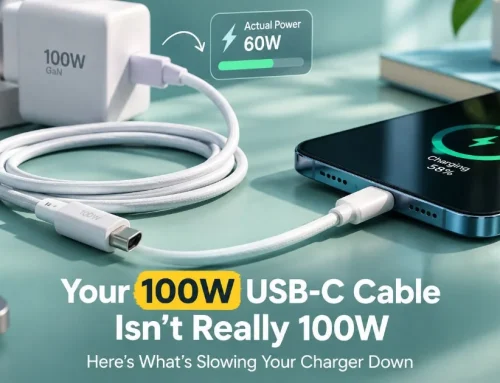
One of the most common reasons for USB cable causing slow charging is simple wear. Internally, cables can break down long before they look damaged on the outside. Pins bend, wires weaken, wattage handling gets worse, and a cable that used to work perfectly can start dragging everything down.
That’s when people end up with phone stuck on slow charging even though the adapter itself is original. It feels unfair, but honestly, the cable is often the cheapest part and the first to fail.
The adapter can be correct and still be wrong
Not every adapter works the same way with every phone. Fast charging depends on the protocol matching too — USB Power Delivery, Quick Charge, SuperVOOC,
TurboPower, Dart Charge, Warp Charge, and a few others in that very confusing family.
So, even if the wattage sounds right, adapter damage or a protocol mismatch can quietly push the phone back to slow speeds. The charger isn’t always bad. Sometimes it’s just not speaking the same language as the phone.
- USB Power Delivery (PD)
- Qualcomm Quick Charge
- SuperVOOC
- TurboPower
- Dart Charge
- Warp Charge
The small, physical things that interrupt charging first
Before you blame the battery or the software, it helps to look at the plain physical stuff. Dust, lint, moisture, looseness, and tiny scuffs from daily use can all interfere with the connection. A dirty charging port fix is often enough to bring things back to normal, which is annoying in the best possible way because the solution can be so ordinary.
Charging is really just contact. If the contact is weak, everything else starts acting weird.
Port grime changes the whole conversation
Once the cable can’t sit properly in the port, the phone may disconnect, hesitate, or drift into slow charging without much warning. A loose-feeling cable matters more than it seems, because the connection is the whole game. Even a little pocket lint can be enough to mess with the fit.
If you’ve experienced charging that starts and stops when you nudge the cable, that’s a huge clue. The problem may not be power at all. It may just be a bad connection.
Heat makes the phone throttle itself
Overheating slows charging because the phone is trying not to cook its own battery while you keep using it, leaving it in the sun, or covering it with a case and blankets and who knows what else. When temperature climbs, fast charging usually disappears first.
That’s not a glitch so much as a safety decision. Phones would rather charge slowly than damage the battery.
What people miss when they blame the charger
Not every slow charge is a hardware fault. Sometimes the phone is busy, tired, or getting power from a weak source. The pattern changes depending on whether the real issue is usage, battery wear, or where the power is coming from.
That’s why the same phone can seem fine one day and sluggish the next. The charger might be innocent. The situation might not be.
Background load can quietly outrun the charger
Gaming, video, GPS, and streaming can make a slow charging issue on phone look much worse than it really is. The phone is trying to refill while also spending power at the same time, so the percentage barely moves and everyone assumes the charger is broken.
Try Airplane Mode, close a few apps, and lower screen activity for a while. Sometimes that makes the real picture obvious. The charger may have been doing its job all along.
Battery health degrades in a way people notice late
A battery health degraded charging pattern is sneaky. It can look like uneven speed, skipped fast charging, random slowdowns, or a phone that just feels old before it looks old. Once a lithium-ion battery falls below about 80% health, the charging experience often becomes less predictable.
That doesn’t mean the phone is unusable. It just means the battery no longer accepts power as smoothly as it used to.
| Situation | What it usually looks like | What it suggests |
|---|---|---|
| Gaming or GPS while charging | Battery percentage barely moves | Power use is outrunning input |
| Older battery | Uneven or skipped fast charging | Battery wear is affecting intake |
| Laptop or weak socket | Charging feels sluggish from the start | Power source is limited |
Wireless charging is slower, and that matters
Wireless charging is slower by design, usually landing far below wired speeds, and it also adds more heat into the mix. So if the switch to wireless made your phone seem broken, it may just be revealing the difference between convenience and speed.
It’s not the same experience, and it’s not supposed to be. It’s easier, yes. Faster, not usually.
What actually tends to fix it
The fix is usually boring and practical: swap the cable, clean the port, cool the phone down, and stop asking the battery to charge while it’s doing a million other things. Those small steps can tell you whether the problem lives in the accessories, the battery, or something deeper.
Most of the time, you don’t need a dramatic fix. You need a simple process that narrows things down.
The order matters more than the list
Start with the cable, then the port, then the adapter. That’s where the cheap failures hide. If slow charging keeps happening across every charger you try, then the battery or internal hardware deserves a closer look.
In other words, don’t jump straight to the worst-case scenario. Eliminate the easy stuff first.
- Replace the cable first
- Clean the charging port gently
- Remove the case while charging
- Avoid heavy use during charging
- Use the original fast charger and cable
- Plug into a wall outlet, not a USB port
- Keep the phone cool
- Update software
- Replace the battery if needed
FAQ
These are the smaller doubts that usually show up after the main cause is already suspected, when you want to know whether the phone is safe, normal, or past the point of a simple fix.
Q: Why does my phone charge slowly only sometimes?
That usually points to a loose cable, a dirty port, heat, or background usage that changes from one charge to the next. Intermittent slow charging is often a contact or temperature problem before it is a battery problem.
Q: Is it normal for wireless charging to feel much slower?
Yes. Wireless charging is slower than wired charging for most phones, and the extra heat can slow it further. It’s normal, even when it feels underwhelming.
Q: How do I know if the battery is the real problem?
If charging stays slow on every charger, the phone is older, and the battery drains oddly or heats up fast, battery wear becomes a real possibility. That’s when battery health degraded charging stops being a theory.
Q: Should I keep charging a phone that gets very hot?
Not really. Overheating slows charging for a reason, and if the phone feels unusually hot or swollen, it should be checked instead of ignored.
Conclusion
The slow charge is usually a sign that the phone is protecting itself, not a sign that everything is broken. In most cases, the answer sits with the cable, adapter, port, heat, or battery age.
So the next move is simple: isolate the weak link, fix the obvious thing first, and only then decide whether the phone needs repair.